
In this tutorial, we will show you an easy way to install your project into your Maven’s local repository, using Apache Maven. Maven is able to build, package and deploy a project to our local repository.
First of all, we must understand how Maven builds and deploys a project. Each Maven project undergoes a specific build lifecycle. The default lifecycle has the following build phases:
| 1. validate | 5. integration-test |
| 2. compile | 6. verify |
| 3. test | 7. install |
| 4. package | 8. deploy |
For more information, please refer to the official Maven introduction to the build lifecycle.
In order to install our Maven project, we must first navigate to its folder, using the terminal (Linux or Mac) or the command prompt (Windows). Then, we must issue the following command:
mvn install
This command is responsible for executing Maven’s install phase. Maven executes each build phase sequentially thus, before the install phase, Maven will execute all previous phases.
1. Sample Execution
Inside the pom.xml file, we can:
- Define our
packagingtype, such asjarorwar. - Define the name of our file.
- Define the version of our file.
<packaging>jar</packaging>
<name>SampleExample</name>
<version>1.0.0</version>
By using the following pom.xml file
pom.xml:
<project xmlns="http://maven.apache.org/POM/4.0.0" xmlns:xsi="http://www.w3.org/2001/XMLSchema-instance" xsi:schemaLocation="http://maven.apache.org/POM/4.0.0 http://maven.apache.org/xsd/maven-4.0.0.xsd">

   <modelVersion>4.0.0</modelVersion>
   <groupId>com.javacodegeeks</groupId>
   <artifactId>SampleExample</artifactId>
   <packaging>jar</packaging>
   <name>SampleExample</name>
   <version>1.0.0</version>

</project>
we create a new file called SampleExample-1.0.0.jar inside our local repository:
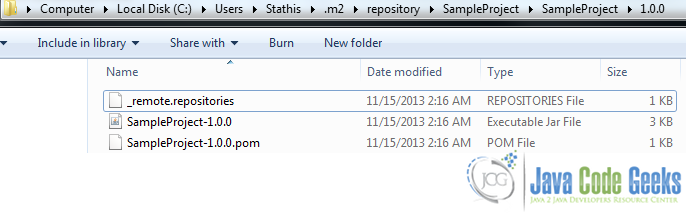
Finally, it is a good practice to use Maven’s install command along with Maven’s clean command as following:
mvn clean install
This command first, cleans our project by removing everything inside the target folder and then, installs our executable file inside Maven’s local repository.
2. Use our Project as a Dependency
After we have successfully installed our project into Maven’s local repository, we can use it as a dependency to another project, by adding to our pom.xml file, the following code snippet:
<dependency>
   <groupId>com.javacodegeeks</groupId>
   <artifactId>SampleExample</artifactId>
   <version>1.0.0</version>
</dependency>
This was a tutorial on how to install a project, using Apache Maven.