
A Content Provider is used to share and access data from a central repository. Usually android applications keep data hidden from the other applications but sometimes, it is useful to share data across them. So, content provider is a suitable reason to share data with other applications, based on a standard interface. There are many different ways to store data in a content provider but in most cases a SQLiteDatabase is used. In this tutorial, we are going to create our own content provider using SQLite database, in which we will store and handle our friends’ birthday.
For this tutorial, we will use the following tools in a Windows 64-bit platform:
- JDK 1.7
- Eclipse 4.2 Juno
- Android SDK 4.4
1. Create a New Android Application Project
Open Eclipse IDE and go to File → New → Project → Android Application Project.
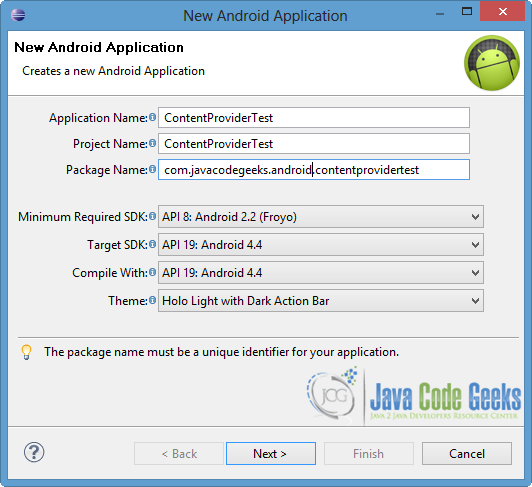
Fill in the name of the application, the project and the package in the appropriate fields and then click Next button.
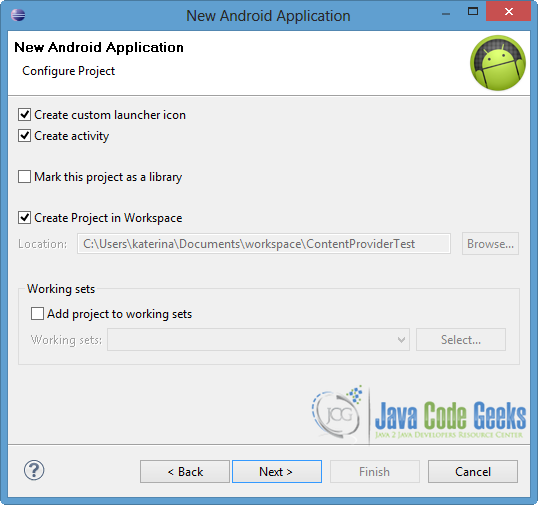
In the next window, the “Create Activity” option should be checked. The new activity will be the main activity of your project. Then press Next.
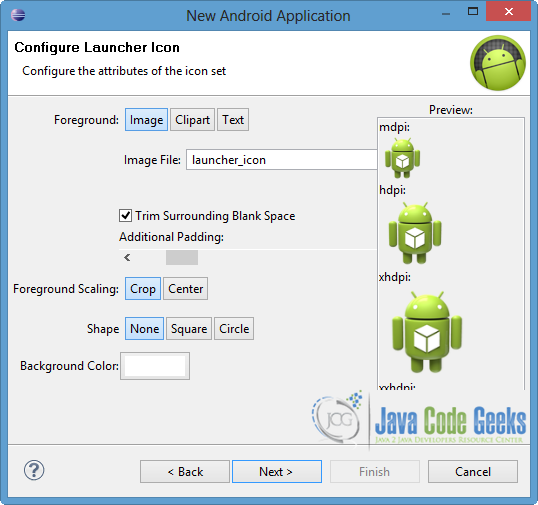
In “Configure Launcher Icon” window you should choose the icon you want to have in your app. In our occasion, we will use the default icon of android, so just press Next.
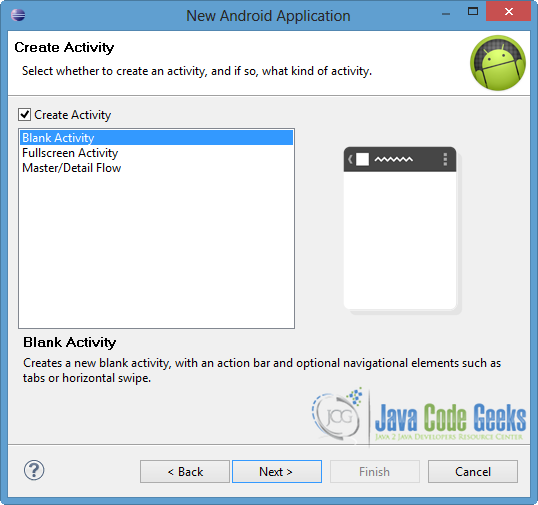
Select the “Blank Activity” option and then press the Next button.
Specify a name for the new Activity and a name for the layout description of your app. The .xml file for the layout will automatically be created in the res/layout folder. In our occasion, we will leave the default names for both files. Press Finish.
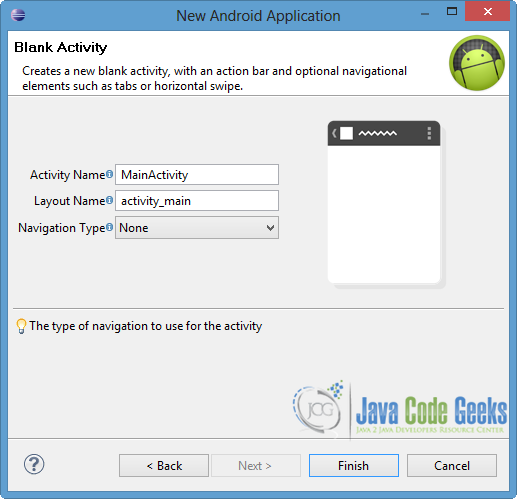
2. Generate a Content Provider
Right click to com.javacodegeeks.android.contentprovidertest package → New → Class.
Specify the name for the new Class and the package you want to put it. We will name it BirthProvider and we will put it in the same package as the MainActivity.java file.
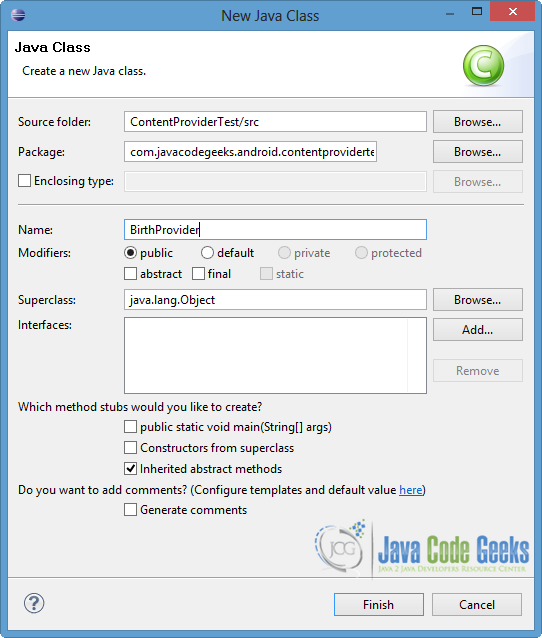
BirthProvider is a subclass of ContentProvider and in order to identify the data in the provider we should use Content URIs. A Content URI has the following format:
content://<authority>/<path>
At the <authority> part we specify the name of the provider (in our occasion is the com.javacodegeeks.provider.Birthday, as you can see in the code below) and the <path> part points to the table. If a specific record is requested, we will add the <id> of that record at the end of the Content URI.
As we already mentioned we are going to use SQLite database, so in order to create and manage it we will use SQLiteOpenHelper. Also, we are going to use the UriMatcher Class, which maps the content URIs with particular patterns. That will help us to choose the desired action for an incoming content URI.
In addition, we want our content provider to work properly so we need to override the functions onCreate(), query(), insert(), update(), delete(), getType(). To learn more about these functions, you can visit the ContentProvider Class Overview.
Open src/com.javacodegeeks.android.contentprovidertest/BirthProvider.java and paste the following code:
BirthProvider.java:
package com.javacodegeeks.android.contentprovidertest;

import java.util.HashMap;
import android.content.ContentProvider;
import android.content.ContentUris;
import android.content.ContentValues;
import android.content.Context;
import android.content.UriMatcher;
import android.database.Cursor;
import android.database.SQLException;
import android.database.sqlite.SQLiteDatabase;
import android.database.sqlite.SQLiteOpenHelper;
import android.database.sqlite.SQLiteQueryBuilder;
import android.net.Uri;
import android.text.TextUtils;
import android.util.Log;

public class BirthProvider extends ContentProvider {
	 // fields for my content provider
	 static final String PROVIDER_NAME = "com.javacodegeeks.provider.Birthday";
	 static final String URL = "content://" + PROVIDER_NAME + "/friends";
	 static final Uri CONTENT_URI = Uri.parse(URL);

	 // fields for the database
	 static final String ID = "id";
	 static final String NAME = "name";
	 static final String BIRTHDAY = "birthday";

	 // integer values used in content URI
	 static final int FRIENDS = 1;
	 static final int FRIENDS_ID = 2;

	 DBHelper dbHelper;

	 // projection map for a query
	 private static HashMap<String, String> BirthMap;

	 // maps content URI "patterns" to the integer values that were set above
	 static final UriMatcher uriMatcher;
	   static{
	      uriMatcher = new UriMatcher(UriMatcher.NO_MATCH);
	      uriMatcher.addURI(PROVIDER_NAME, "friends", FRIENDS);
	      uriMatcher.addURI(PROVIDER_NAME, "friends/#", FRIENDS_ID);
	   }

	   // database declarations
	   private SQLiteDatabase database;
	   static final String DATABASE_NAME = "BirthdayReminder";
	   static final String TABLE_NAME = "birthTable";
	   static final int DATABASE_VERSION = 1;
	   static final String CREATE_TABLE =
	      " CREATE TABLE " + TABLE_NAME +
	      " (id INTEGER PRIMARY KEY AUTOINCREMENT, " +
	      " name TEXT NOT NULL, " +
	      " birthday TEXT NOT NULL);";


	   // class that creates and manages the provider's database
	   private static class DBHelper extends SQLiteOpenHelper {

		public DBHelper(Context context) {
			super(context, DATABASE_NAME, null, DATABASE_VERSION);
			// TODO Auto-generated constructor stub
		}

		@Override
		public void onCreate(SQLiteDatabase db) {
			// TODO Auto-generated method stub
			 db.execSQL(CREATE_TABLE);
		}

		@Override
		public void onUpgrade(SQLiteDatabase db, int oldVersion, int newVersion) {
			// TODO Auto-generated method stub
			Log.w(DBHelper.class.getName(),
			        "Upgrading database from version " + oldVersion + " to "
			            + newVersion + ". Old data will be destroyed");
			db.execSQL("DROP TABLE IF EXISTS " +  TABLE_NAME);
	        onCreate(db);
		}

	   }

	@Override
	public boolean onCreate() {
		// TODO Auto-generated method stub
		Context context = getContext();
		dbHelper = new DBHelper(context);
		// permissions to be writable
		database = dbHelper.getWritableDatabase();

	    if(database == null)
	    	return false;
	    else
	    	return true;
	}

	@Override
	public Cursor query(Uri uri, String[] projection, String selection,
			String[] selectionArgs, String sortOrder) {
		// TODO Auto-generated method stub
		 SQLiteQueryBuilder queryBuilder = new SQLiteQueryBuilder();
		 // the TABLE_NAME to query on
		 queryBuilder.setTables(TABLE_NAME);

	      switch (uriMatcher.match(uri)) {
	      // maps all database column names
	      case FRIENDS:
	    	  queryBuilder.setProjectionMap(BirthMap);
	         break;
	      case FRIENDS_ID:
	    	  queryBuilder.appendWhere( ID + "=" + uri.getLastPathSegment());
	         break;
	      default:
	         throw new IllegalArgumentException("Unknown URI " + uri);
	      }
	      if (sortOrder == null || sortOrder == ""){
	         // No sorting-> sort on names by default
	         sortOrder = NAME;
	      }
	      Cursor cursor = queryBuilder.query(database, projection, selection,
	    		  selectionArgs, null, null, sortOrder);
	      /**
	       * register to watch a content URI for changes
	       */
	      cursor.setNotificationUri(getContext().getContentResolver(), uri);

	      return cursor;
	}

	@Override
	public Uri insert(Uri uri, ContentValues values) {
		// TODO Auto-generated method stub
		long row = database.insert(TABLE_NAME, "", values);

		// If record is added successfully
	      if(row > 0) {
	         Uri newUri = ContentUris.withAppendedId(CONTENT_URI, row);
	         getContext().getContentResolver().notifyChange(newUri, null);
	         return newUri;
	      }
	      throw new SQLException("Fail to add a new record into " + uri);
	}

	@Override
	public int update(Uri uri, ContentValues values, String selection,
			String[] selectionArgs) {
		// TODO Auto-generated method stub
		 int count = 0;

	      switch (uriMatcher.match(uri)){
	      case FRIENDS:
	         count = database.update(TABLE_NAME, values, selection, selectionArgs);
	         break;
	      case FRIENDS_ID:
	         count = database.update(TABLE_NAME, values, ID +
	                 " = " + uri.getLastPathSegment() +
	                 (!TextUtils.isEmpty(selection) ? " AND (" +
	                 selection + ')' : ""), selectionArgs);
	         break;
	      default:
	         throw new IllegalArgumentException("Unsupported URI " + uri );
	      }
	      getContext().getContentResolver().notifyChange(uri, null);
	      return count;
	}

	@Override
	public int delete(Uri uri, String selection, String[] selectionArgs) {
		// TODO Auto-generated method stub
		int count = 0;

		 switch (uriMatcher.match(uri)){
	      case FRIENDS:
	    	  // delete all the records of the table
	    	  count = database.delete(TABLE_NAME, selection, selectionArgs);
	    	  break;
	      case FRIENDS_ID:
	      	  String id = uri.getLastPathSegment();	//gets the id
	          count = database.delete( TABLE_NAME, ID +  " = " + id +
	                (!TextUtils.isEmpty(selection) ? " AND (" +
	                selection + ')' : ""), selectionArgs);
	          break;
	      default:
	          throw new IllegalArgumentException("Unsupported URI " + uri);
	      }

	      getContext().getContentResolver().notifyChange(uri, null);
	      return count;


	}

	@Override
	public String getType(Uri uri) {
		// TODO Auto-generated method stub
		switch (uriMatcher.match(uri)){
	      // Get all friend-birthday records
	      case FRIENDS:
	         return "vnd.android.cursor.dir/vnd.example.friends";
	      // Get a particular friend
	      case FRIENDS_ID:
	         return "vnd.android.cursor.item/vnd.example.friends";
	      default:
	         throw new IllegalArgumentException("Unsupported URI: " + uri);
	      }
	}


}
At this point it is good to mention another way to implement the delete() method. Instead of deleting rows from your data storage, you can use a sync adapter with a “delete” flag. The sync adapter can remove the deleted rows from the server first and then from the provider.
3. Register the Content Provider
We should register our provider, so the application could read from and write to our provider. To set the permissions, it is needed to add the provider to the AndroidManifest.xml file using <provider> … </provider> tags.
To add our provider, open AndroidManifest.xml file, at the last tab – named “AndroidManifest.xml” – and paste the following code.
AndroidManifest.xml:
<?xml version="1.0" encoding="utf-8"?>
<manifest xmlns:android="http://schemas.android.com/apk/res/android"
    package="com.javacodegeeks.android.contentprovidertest"
    android:versionCode="1"
    android:versionName="1.0" >

    <uses-sdk
        android:minSdkVersion="8"
        android:targetSdkVersion="19" />

    <application
        android:allowBackup="true"
        android:icon="@drawable/ic_launcher"
        android:label="@string/app_name"
        android:theme="@style/AppTheme" >
        <activity
            android:name="com.javacodegeeks.android.contentprovidertest.MainActivity"
            android:label="@string/app_name" >
            <intent-filter>
                <action android:name="android.intent.action.MAIN" />

                <category android:name="android.intent.category.LAUNCHER" />
            </intent-filter>
        </activity>
         <provider android:name="BirthProvider"
           	android:authorities="com.javacodegeeks.provider.Birthday">
        </provider>
    </application>

</manifest>
4. Access Data in a Content Provider
When an application wants to access the data of a ContentProvider, it makes a request. These requests are handled by the ContentResolver object, which communicates with the ContentProvider as a client.
In our example, we add three functions (deleteAllBirthdays (View view), addBirthday(View view), showAllBirthdays(View view)) to have user interaction with the application. The user can add a new record in our provider, delete or show all of them.
Open src/com.javacodegeeks.android.contentprovidertest/MainActivity.java and paste the following code.
MainActivity.java:
package com.javacodegeeks.android.contentprovidertest;

import android.net.Uri;
import android.os.Bundle;
import android.app.Activity;
import android.content.ContentValues;
import android.database.Cursor;
import android.view.Menu;
import android.view.View;
import android.widget.EditText;
import android.widget.Toast;

public class MainActivity extends Activity {

	@Override
	protected void onCreate(Bundle savedInstanceState) {
		super.onCreate(savedInstanceState);
		setContentView(R.layout.activity_main);
	}

	@Override
	public boolean onCreateOptionsMenu(Menu menu) {
		// Inflate the menu; this adds items to the action bar if it is present.
		getMenuInflater().inflate(R.menu.main, menu);
		return true;
	}


	public void deleteAllBirthdays (View view) {
		// delete all the records and the table of the database provider
		String URL = "content://com.javacodegeeks.provider.Birthday/friends";
	        Uri friends = Uri.parse(URL);
		int count = getContentResolver().delete(
				 friends, null, null);
		String countNum = "Javacodegeeks: "+ count +" records are deleted.";
		Toast.makeText(getBaseContext(),
			      countNum, Toast.LENGTH_LONG).show();

	}

	 public void addBirthday(View view) {
	      // Add a new birthday record
	      ContentValues values = new ContentValues();

	      values.put(BirthProvider.NAME,
	           ((EditText)findViewById(R.id.name)).getText().toString());

	      values.put(BirthProvider.BIRTHDAY,
	           ((EditText)findViewById(R.id.birthday)).getText().toString());

	      Uri uri = getContentResolver().insert(
	    	   BirthProvider.CONTENT_URI, values);

	      Toast.makeText(getBaseContext(),
	    	   "Javacodegeeks: " + uri.toString() + " inserted!", Toast.LENGTH_LONG).show();
	   }


	   public void showAllBirthdays(View view) {
	      // Show all the birthdays sorted by friend's name
	      String URL = "content://com.javacodegeeks.provider.Birthday/friends";
	      Uri friends = Uri.parse(URL);
	      Cursor c = getContentResolver().query(friends, null, null, null, "name");
	      String result = "Javacodegeeks Results:";

	      if (!c.moveToFirst()) {
	    	  Toast.makeText(this, result+" no content yet!", Toast.LENGTH_LONG).show();
	      }else{
	    	  do{
	            result = result + "\n" + c.getString(c.getColumnIndex(BirthProvider.NAME)) +
	    	            " with id " +  c.getString(c.getColumnIndex(BirthProvider.ID)) +
	    	            " has birthday: " + c.getString(c.getColumnIndex(BirthProvider.BIRTHDAY));
	          } while (c.moveToNext());
	    	  Toast.makeText(this, result, Toast.LENGTH_LONG).show();
	      }

	   }
}
You will notice some errors in the MainActivity.java file. That is happening because we didn’t define the Buttons and the EditTexts yet.
5. User Interface
We need a simple user interface to make the above three functions work. We are going to add two EditTexts fields, where the user can fill in the name and the birthday of his/her friend. Also, we are going to add three Buttons with ids btnAdd, btnShow, btnDelete, where each one is connected with a specific function in the MainActivity.java (addBirthday(View view), showAllBirthdays(View view), deleteAllBirthdays (View view) respectively).
Open res/layout/activity_main.xml, as shown in the image below.
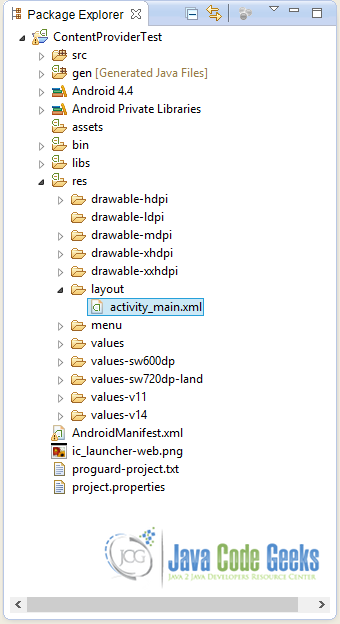
Go to the xml tab of the file and then paste the following code.
activity_main.xml:
<RelativeLayout xmlns:android="http://schemas.android.com/apk/res/android"
    xmlns:tools="http://schemas.android.com/tools"
    android:layout_width="match_parent"
    android:layout_height="match_parent"
    android:paddingBottom="@dimen/activity_vertical_margin"
    android:paddingLeft="@dimen/activity_horizontal_margin"
    android:paddingRight="@dimen/activity_horizontal_margin"
    android:paddingTop="@dimen/activity_vertical_margin"
    tools:context=".MainActivity" >

    <EditText
	     android:id="@+id/name"
	     android:layout_width="fill_parent"
	     android:layout_height="wrap_content"
	     android:ems="10"
	     android:hint="@string/name" />

     <EditText
	     android:id="@+id/birthday"
	     android:layout_width="fill_parent"
         android:layout_height="wrap_content"
	     android:layout_alignLeft="@+id/name"
	     android:layout_below="@+id/name"
	     android:ems="10"
	     android:hint="@string/birthday" />

     <Button
         android:id="@+id/btnAdd"
         android:layout_width="fill_parent"
         android:layout_height="wrap_content"
         android:onClick="addBirthday"
         android:layout_alignLeft="@+id/birthday"
         android:layout_below="@+id/birthday"
         android:layout_marginTop="30dp"
         android:text="@string/add" />

     <Button
         android:id="@+id/btnShow"
         android:layout_width="fill_parent"
         android:layout_height="wrap_content"
         android:layout_alignLeft="@+id/btnAdd"
         android:layout_below="@+id/btnAdd"
         android:layout_marginTop="20dp"
         android:onClick="showAllBirthdays"
         android:text="@string/show" />

     <Button
         android:id="@+id/btnDelete"
         android:layout_width="fill_parent"
         android:layout_height="wrap_content"
         android:layout_below="@+id/btnShow"
         android:layout_alignLeft="@+id/btnShow"
         android:layout_marginTop="20dp"
         android:onClick="deleteAllBirthdays"
         android:text="@string/delete" />

</RelativeLayout>
You will notice errors in the highlighted lines. To solve these errors, we should define the respective strings.
Open res/values/strings.xml file to the “strings.xml” tab and paste the following code.
strings.xml:
<?xml version="1.0" encoding="utf-8"?>
<resources>

    <string name="app_name">ContentProviderTest</string>
    <string name="action_settings">Settings</string>
    <string name="birthday">Birthday</string>
    <string name="name">Name</string>
    <string name="add">Add a new Birthday</string>
    <string name="show">Show all Birthdays</string>
    <string name="delete">Delete all Birthdays</string>

</resources>
6. Run the application
Now we are ready to run our application. To do this, right click to our project → Run as → Android Application. The AVD will appear with the app loaded.
Lets add our first record in our provider (for instance George – 5 May) and press the Add a new Birthday button. As we can see in the image below, the new record has successfully been added with id=1 (seen from content URI).
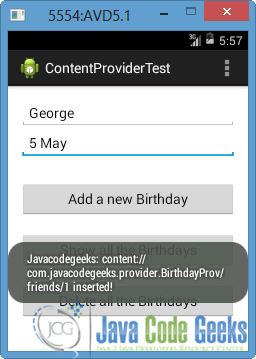
Let’s put two more records (for example Mary – 14 April and John – 3 June). If we press the Show all Birthdays button, we will receive all the records as a result (see the picture below).
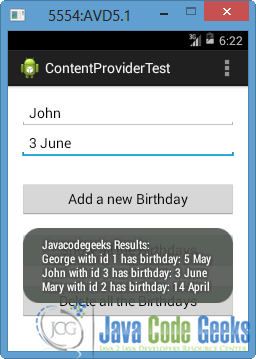
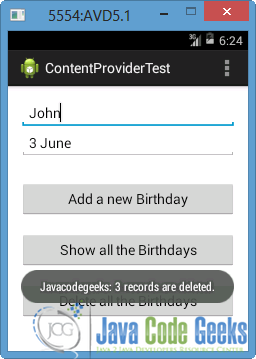
Finally, if we press the Delete all Birthdays button we will see that the 3 records are deleted.
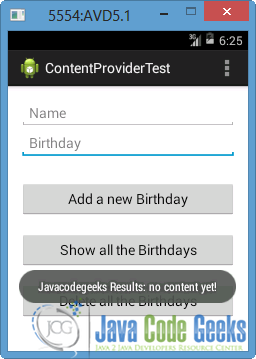
We can also understand that, when we press the Show all Birthdays button and the “Javacodegeeks Results: no content yet!” message is appeared.
Download Eclipse Project
This was an example of Content Provider in Android. Download the Eclipse Project of this example: ContentProviderTest.zip


Hi Katerina Zamani, This Tutorial is very good and clear. But i am facing error once i click ShowallBirthday and deleteallbirthday buttons. AndroidRuntime: FATAL EXCEPTION: main Process: com.example.rahul.mycontentprovider, PID: 31983 java.lang.IllegalStateException: Could not execute method for android:onClick atandroid.support.v7.app.AppCompatViewInflater$DeclaredOnClickListener.onClick(AppCompatViewInflater.java:293) at android.view.View.performClick(View.java:5624) at android.view.View$PerformClick.run(View.java:22441) at android.os.Handler.handleCallback(Handler.java:751) at android.os.Handler.dispatchMessage(Handler.java:95) at android.os.Looper.loop(Looper.java:154) at android.app.ActivityThread.main(ActivityThread.java:6316) at java.lang.reflect.Method.invoke(Native Method) at com.android.internal.os.ZygoteInit$MethodAndArgsCaller.run(ZygoteInit.java:872) at com.android.internal.os.ZygoteInit.main(ZygoteInit.java:762) Caused by: java.lang.reflect.InvocationTargetException at java.lang.reflect.Method.invoke(Native Method) atandroid.support.v7.app.AppCompatViewInflater$DeclaredOnClickListener.onClick(AppCompatViewInflater.java:288) at android.view.View.performClick(View.java:5624) at android.view.View$PerformClick.run(View.java:22441) at android.os.Handler.handleCallback(Handler.java:751) at android.os.Handler.dispatchMessage(Handler.java:95) at android.os.Looper.loop(Looper.java:154) at android.app.ActivityThread.main(ActivityThread.java:6316) at java.lang.reflect.Method.invoke(Native Method) at com.android.internal.os.ZygoteInit$MethodAndArgsCaller.run(ZygoteInit.java:872) at com.android.internal.os.ZygoteInit.main(ZygoteInit.java:762) Caused by: java.lang.NullPointerException: Attempt to invoke interface method ‘boolean android.database.Cursor.moveToFirst()’ on a null object reference at com.example.rahul.mycontentprovider.MainActivity.showAllBirthdays(MainActivity.java:35)… Read more »
Hello Chandra, please put condition if (cursor != null && cursor.getCount() >0 && cursor.moveToFirst())
This should work. :)