
1. Introduction
Vaadin is a web application framework written in Java, and is built on Google Web Toolkit from Vaadin Ltd.
Spring Security is a part of Spring framework that focuses on providing both authentication and authorization to Java applications. Both Vaadin and Spring Security are open sourced and licensed under the Apache 2.0 license.
In this example, we will build a web application in three steps:
- Create a Vaadin web application from the Vaadin archetype
- Modify the generated Vaadin web application with model-view-controller patterns
- Secure the Vaadin web application with a login page via Spring Security framework
2. Technologies Used
The example code in this article was built and run using:
- Java 1.8.101 (1.8.x will do fine)
- Maven 3.3.9 (3.3.x will do fine)
- Eclipse Mars (Any Java IDE would work)
- Vaadin 8.1.5 (7.x will do fine)
- Spring Security 4.2.3.RELEASE (5.x will do fine)
- Jetty 9.x
3. A Generated Vaadin Web Application
Vaadin is designed for creating rich and interactive applications that run in the browser. If you have not worked with Vaadin before, please check it out here.
In this step, we will create a web application via the Vaadin Maven archetype.
3.1 Create a Vaadin Maven Project
Install the Eclipse Vaadin plug-in by following the instructions here.
Create a Vaadin Maven project with the steps below:
- File->New->Vaadin->Vaadin 8 Project, then click next

Figure 1 Eclipse Vaadin Project - Keep the default option as
Single-Module Application Project, then click next - Enter the Group Id as
jcg.demoand Artifact Id asVaadin-Spring-Security, then hit finish
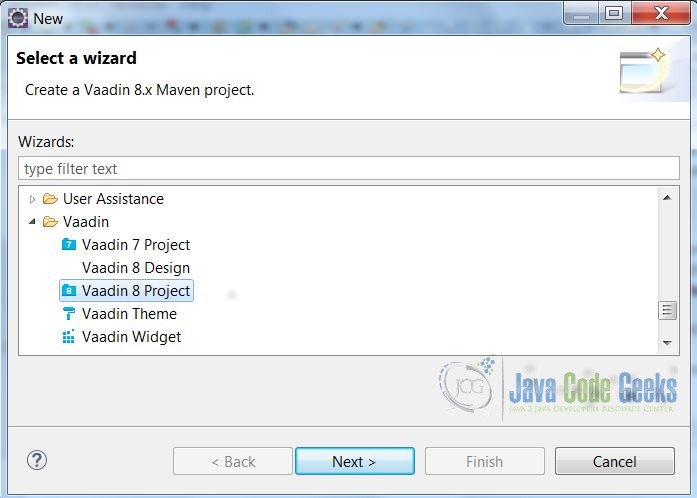
It will generate a Maven Vaadin project with MyUI.java and README.txt. Follow the instructions in README.txt to build and run the project.
3.2 Review Generated MyUI.java
The generated MyUI.java has an init method which constructs a VerticalLayout with a TextField to take the user’s input and a Click Me button. The Click Me button displays the entered data.
MyUI.java
package jcg.demo.ui.vaadin;

import javax.servlet.annotation.WebServlet;

import com.vaadin.annotations.Theme;
import com.vaadin.annotations.VaadinServletConfiguration;
import com.vaadin.server.VaadinRequest;
import com.vaadin.server.VaadinServlet;
import com.vaadin.ui.Button;
import com.vaadin.ui.Label;
import com.vaadin.ui.TextField;
import com.vaadin.ui.UI;
import com.vaadin.ui.VerticalLayout;

/**
 * This UI is the application entry point. A UI may either represent a browser window
 * (or tab) or some part of a html page where a Vaadin application is embedded.
 * <p>
 * The UI is initialized using {@link #init(VaadinRequest)}. This method is intended to be
 * overridden to add component to the user interface and initialize non-component functionality.
 */
@Theme("mytheme")
public class MyUI extends UI {

    @Override
    protected void init(VaadinRequest vaadinRequest) {
        final VerticalLayout layout = new VerticalLayout();

        final TextField name = new TextField();
        name.setCaption("Type your name here:");

        Button button = new Button("Click Me");
        button.addClickListener( e -> {
            layout.addComponent(new Label("Thanks " + name.getValue()
                    + ", it works!"));
        });

        layout.addComponents(name, button);
        layout.setMargin(true);
        layout.setSpacing(true);

        setContent(layout);
    }

    @WebServlet(urlPatterns = "/*", name = "MyUIServlet", asyncSupported = true)
    @VaadinServletConfiguration(ui = MyUI.class, productionMode = false)
    public static class MyUIServlet extends VaadinServlet {
    }
}
3.3 Demo Generated Vaadin Web Application
Execute Jetty:run and go to http://localhost:8080. Enter a name and then hit the Click Me button. Repeat this process with different names and see the different outcomes.
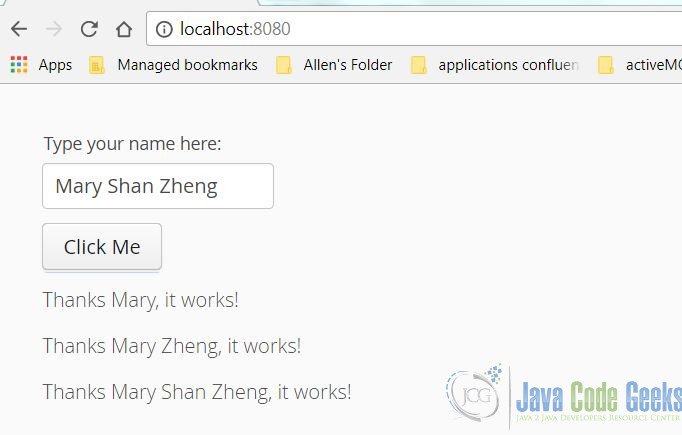
Note: The entered data is displayed on top of each other.
4. Modify the Vaadin Application
Model View Controller (MVC) is a very useful and popular design pattern for a web application.
In this step, we will modify the generated MyUI.java by displaying the view data from a data model class: InputData and using the controller class InputController to set the view data.
4.1 Data Model
Create an InputData model to capture the name from the user’s input and moreData from the back end service’s operation. It is the “Model” part of MVC.
InputData.java
package jcg.demo.model;

public class InputData {
	public InputData() {
		super();
	}

	public InputData(String name) {
		super();
		this.name = name;
	}

	private String name;
	private String moreData;

	public String getName() {
		return name;
	}

	public void setName(String name) {
		this.name = name;
	}

	public String getMoreData() {
		return moreData;
	}

	public void setMoreData(String moreData) {
		this.moreData = moreData;
	}

}
4.2 Service
Create an UserDataService to look up the additional data based on the name. It will be used by the controller.
UserDataService.java
package jcg.demo.service;

import org.springframework.stereotype.Service;

import jcg.demo.model.InputData;

@Service
public class UserDataService {

	public InputData findData(String name) {
		InputData inputData = new InputData(name);
		switch (name) {
		case "mary":
			inputData.setMoreData("Zheng");
			break;
		case "tom":
			inputData.setMoreData("Johnson");
			break;
		default:
			inputData.setMoreData("Cool dude!");
		}

		return inputData;

	}

}
4.3 Controller
Create an InputController to return the InputData created at step 4.1 based on the user’s input. This is the “Controller” part of the MVC.
InputController.java
package jcg.demo.ui.vaadin;

import org.springframework.beans.factory.annotation.Autowired;
import org.springframework.stereotype.Component;

import jcg.demo.model.InputData;
import jcg.demo.service.UserDataService;

@Component
public class InputController {

	@Autowired
	private UserDataService userService ;

	public InputData setUserInput(String value) {
		return userService.findData(value);
	}

}
4.4 View
Modify the generated MyUI.java to display the data from InputData created at step 4.1 which is set by the InputController created at step 4.3. This is the “View” part of MVC.
MyUI.java
package jcg.demo.ui.vaadin;

import javax.servlet.annotation.WebServlet;

import org.springframework.beans.factory.annotation.Autowired;
import org.springframework.security.web.authentication.logout.SecurityContextLogoutHandler;

import com.vaadin.annotations.Theme;
import com.vaadin.annotations.VaadinServletConfiguration;
import com.vaadin.server.Page;
import com.vaadin.server.VaadinRequest;
import com.vaadin.server.VaadinService;
import com.vaadin.spring.annotation.SpringUI;
import com.vaadin.spring.server.SpringVaadinServlet;
import com.vaadin.ui.Button;
import com.vaadin.ui.Label;
import com.vaadin.ui.TextField;
import com.vaadin.ui.UI;
import com.vaadin.ui.VerticalLayout;

import jcg.demo.model.InputData;

/**
 * This UI is the application entry point. A UI may either represent a browser
 * window (or tab) or some part of an HTML page where a Vaadin application is
 * embedded.
 *
 * The UI is initialized using {@link #init(VaadinRequest)}. This method is
 * intended to be overridden to add component to the user interface and
 * initialize non-component functionality.
 */
@SuppressWarnings("serial")
@Theme("mytheme")
@SpringUI(path = "/app")
public class MyUI extends UI {

	@Autowired
	private InputController controller;

	private InputData inputData;

	@Override
	protected void init(VaadinRequest vaadinRequest) {
		final VerticalLayout layout = new VerticalLayout();

		final TextField name = new TextField();
		name.setCaption("Type your name here:");

		Label sessionIdLabel = new Label();


		Label dataFromService_Name = new Label();
		dataFromService_Name.setVisible(false);

		Label dataFromService_more = new Label();
		dataFromService_more.setVisible(false);

		layout.addComponent(name);
		layout.addComponent(sessionIdLabel);
		layout.addComponent(dataFromService_Name);
		layout.addComponent(dataFromService_more);


		Button button = new Button("Click Me");
		button.addClickListener(e -> {
			inputData = controller.setUserInput(name.getValue());
			String sessionID = ((com.vaadin.server.VaadinServletRequest) VaadinService.getCurrentRequest())
					.getHttpServletRequest().getSession().getId();

			sessionIdLabel.setValue(sessionID);
			dataFromService_Name.setValue("Thanks, you entered: " + inputData.getName() );
			dataFromService_Name.setVisible(true);

			dataFromService_more.setValue("Thanks, it has more data: " + inputData.getMoreData() );
			dataFromService_more.setVisible(true);

		});

		layout.addComponent(button);

		setContent(layout);
	}

	@WebServlet(urlPatterns = "/*", name = "MyUIServlet", asyncSupported = true)
	@VaadinServletConfiguration(ui = MyUI.class, productionMode = false)
	public static class MyUIServlet extends SpringVaadinServlet {
	}
}
4.5 Demo Modified Vaadin Web Application
Execute Jetty:run and go to http://localhost:8080.
Enter a name and then click the Click Me button several times.
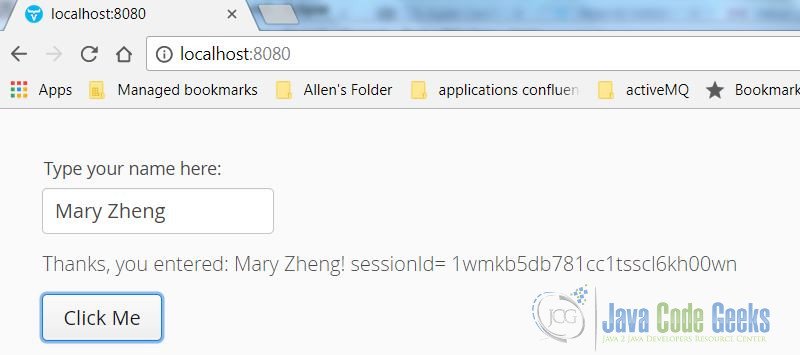
Note: Only the last entered data is displayed.
5. Secure the Web Application
If you already know how to use Spring Security, skip forward, if not, check it out here.
Spring Security framework has two key context objects which an application must interact with:
SecurityContextHolder–SecurityContextHoldercontains information about the current security context of the application, which includes detailed information about the user currently working with the application.UserDetailsService–UserDetailsServiceis used to create aUserDetailsobject by implementing the single method of this interface:UserDetails loadUserByUsername (String username) throws UsernameNotFoundException
There are four steps needed to secure a web application with a login page via the Spring Security framework:
- The user logs in with a name and a password. These two credentials are combined into an instance of the class
UsernamePasswordAuthenticationToken. Then, they are passed to theAuthenticationManagerfor verification. - If the username does not match the password, the
BadCredentialsExceptionis returned along with the message “Bad Credentials.” - If the username and password match, it will return a populated
authenticationinstance. - The user sets a security context by calling the
SecurityContextHolder.getContext().setAuthentication()method, where the object that returned fromauthenticationProvider.authenticate()is passed.
5.1 Dependencies
Modify the POM.xml to add the Spring Security framework dependencies.
pom.xml
<?xml version="1.0" encoding="UTF-8"?>
<project xmlns="http://maven.apache.org/POM/4.0.0" xmlns:xsi="http://www.w3.org/2001/XMLSchema-instance"
	xsi:schemaLocation="http://maven.apache.org/POM/4.0.0 http://maven.apache.org/xsd/maven-4.0.0.xsd">
	<modelVersion>4.0.0</modelVersion>

	<groupId>jcg.demo.mary</groupId>
	<artifactId>vaadin-spring-security</artifactId>
	<packaging>war</packaging>
	<version>1.0-SNAPSHOT</version>
	<name>Vaadin Spring Security Integration</name>

	<prerequisites>
		<maven>3</maven>
	</prerequisites>

	<properties>
		<spring.version>4.2.3.RELEASE</spring.version>
		<vaadin.version>8.1.5</vaadin.version>
		<vaadin.plugin.version>8.1.5</vaadin.plugin.version>
		<jetty.plugin.version>9.3.9.v20160517</jetty.plugin.version>
		<project.build.sourceEncoding>UTF-8</project.build.sourceEncoding>
		<maven.compiler.source>1.8</maven.compiler.source>
		<maven.compiler.target>1.8</maven.compiler.target>
		<vaadin.widgetset.mode>local</vaadin.widgetset.mode>
	</properties>

	<repositories>
		<repository>
			<id>vaadin-addons</id>
			<url>http://maven.vaadin.com/vaadin-addons</url>
		</repository>
	</repositories>

	<dependencyManagement>
		<dependencies>
			<dependency>
				<groupId>com.vaadin</groupId>
				<artifactId>vaadin-bom</artifactId>
				<version>${vaadin.version}</version>
				<type>pom</type>
				<scope>import</scope>
			</dependency>
		</dependencies>
	</dependencyManagement>

	<dependencies>
		<dependency>
			<groupId>javax.servlet</groupId>
			<artifactId>javax.servlet-api</artifactId>
			<version>3.0.1</version>
			<scope>provided</scope>
		</dependency>
		<dependency>
			<groupId>com.vaadin</groupId>
			<artifactId>vaadin-server</artifactId>
		</dependency>
		<dependency>
			<groupId>com.vaadin</groupId>
			<artifactId>vaadin-push</artifactId>
		</dependency>
		<dependency>
			<groupId>com.vaadin</groupId>
			<artifactId>vaadin-client-compiled</artifactId>
		</dependency>
		<dependency>
			<groupId>com.vaadin</groupId>
			<artifactId>vaadin-themes</artifactId>
		</dependency>

		<dependency>
			<groupId>com.vaadin</groupId>
			<artifactId>vaadin-spring</artifactId>
		</dependency>
		<dependency>
			<groupId>org.springframework.security</groupId>
			<artifactId>spring-security-web</artifactId>
			<version>${spring.version}</version>
		</dependency>
		<dependency>
			<groupId>org.springframework.security</groupId>
			<artifactId>spring-security-config</artifactId>
			<version>${spring.version}</version>
		</dependency>
		<dependency>
			<groupId>org.springframework</groupId>
			<artifactId>spring-web</artifactId>
			<version>${spring.version}</version>
		</dependency>
		<dependency>
			<groupId>commons-logging</groupId>
			<artifactId>commons-logging</artifactId>
			<version>1.1.1</version>
		</dependency>

	</dependencies>

	<build>
		<plugins>
			<plugin>
				<groupId>org.apache.maven.plugins</groupId>
				<artifactId>maven-war-plugin</artifactId>
				<version>3.0.0</version>
				<configuration>
					<failOnMissingWebXml>false</failOnMissingWebXml>
					<!-- Exclude an unnecessary file generated by the GWT compiler. -->
					<packagingExcludes>WEB-INF/classes/VAADIN/widgetsets/WEB-INF/**</packagingExcludes>
				</configuration>
			</plugin>


			<plugin>
				<groupId>com.vaadin</groupId>
				<artifactId>vaadin-maven-plugin</artifactId>
				<version>${vaadin.plugin.version}</version>
				<executions>
					<execution>
						<goals>
							<goal>update-theme</goal>
							<goal>update-widgetset</goal>
							<goal>compile</goal>
							<!-- Comment out compile-theme goal to use on-the-fly theme compilation -->
							<goal>compile-theme</goal>
						</goals>
					</execution>
				</executions>
			</plugin>
			<plugin>
				<groupId>org.apache.maven.plugins</groupId>
				<artifactId>maven-clean-plugin</artifactId>
				<version>3.0.0</version>
				<!-- Clean up also any pre-compiled themes -->
				<configuration>
					<filesets>
						<fileset>
							<directory>src/main/webapp/VAADIN/themes</directory>
							<includes>
								<include>**/styles.css</include>
								<include>**/styles.scss.cache</include>
							</includes>
						</fileset>
					</filesets>
				</configuration>
			</plugin>

			<!-- The Jetty plugin allows us to easily test the development build by
				running jetty:run on the command line. -->
			<plugin>
				<groupId>org.eclipse.jetty</groupId>
				<artifactId>jetty-maven-plugin</artifactId>
				<version>${jetty.plugin.version}</version>
				<configuration>
					<scanIntervalSeconds>2</scanIntervalSeconds>
				</configuration>
			</plugin>

			<plugin>
				<groupId>org.codehaus.mojo</groupId>
				<artifactId>tomcat-maven-plugin</artifactId>
				<version>1.0-beta-1</version>
			</plugin>
		</plugins>
	</build>

	<profiles>
		<profile>
			<!-- Vaadin pre-release repositories -->
			<id>vaadin-prerelease</id>
			<activation>
				<activeByDefault>false</activeByDefault>
			</activation>

			<repositories>
				<repository>
					<id>vaadin-prereleases</id>
					<url>http://maven.vaadin.com/vaadin-prereleases</url>
				</repository>
				<repository>
					<id>vaadin-snapshots</id>
					<url>https://oss.sonatype.org/content/repositories/vaadin-snapshots/</url>
					<releases>
						<enabled>false</enabled>
					</releases>
					<snapshots>
						<enabled>true</enabled>
					</snapshots>
				</repository>
			</repositories>
			<pluginRepositories>
				<pluginRepository>
					<id>vaadin-prereleases</id>
					<url>http://maven.vaadin.com/vaadin-prereleases</url>
				</pluginRepository>
				<pluginRepository>
					<id>vaadin-snapshots</id>
					<url>https://oss.sonatype.org/content/repositories/vaadin-snapshots/</url>
					<releases>
						<enabled>false</enabled>
					</releases>
					<snapshots>
						<enabled>true</enabled>
					</snapshots>
				</pluginRepository>
			</pluginRepositories>
		</profile>
	</profiles>

</project>
5.2 UserDetailsService Interface
Spring Security framework provides UserDetailsService interface which allows an application to implement the loadUserByUsername method. Create AuthUserDetailsService by implementing UserDetailsService's loadUserByUsername.
AuthUserDetailsService.java
package jcg.demo.service;

import org.springframework.beans.factory.annotation.Autowired;
import org.springframework.security.core.userdetails.UserDetails;
import org.springframework.security.core.userdetails.UsernameNotFoundException;
import org.springframework.stereotype.Service;


@Service
public class AuthUserDetailsService implements org.springframework.security.core.userdetails.UserDetailsService {

	@Autowired
	private AuthUserLookUpService userLookupService;

	@Override
	public UserDetails loadUserByUsername(String username) throws UsernameNotFoundException {

		return userLookupService.findUser(username);
	}

}
5.3 Service
Create an AuthUserLookUpService to set up two users for the web application.
AuthUserLookUpService.java
package jcg.demo.service;

import org.springframework.stereotype.Service;

import jcg.demo.model.User;

@Service
public class AuthUserLookUpService {

	User findUser(String username) {
		User found = null;
		switch (username) {
		case "admin":
			found = new User("admin", "admin");
			break;
		case "mzheng":
			found = new User("mzheng", "great");
			break;
		}
		return found;
	}

}
5.4 Login Page
Create a LoginUI which allows users to enter their username and password and authenticate it before continuing onto the main application. The AuthenticationProvider is utilized to authenticate the user, and if the user passes the authentication, then they are directed to the main application page, otherwise display the error message.

LoginUI.java
package jcg.demo.ui.vaadin;

import java.net.MalformedURLException;
import java.net.URI;

import org.springframework.beans.factory.annotation.Autowired;
import org.springframework.security.authentication.AnonymousAuthenticationToken;
import org.springframework.security.authentication.AuthenticationProvider;
import org.springframework.security.authentication.UsernamePasswordAuthenticationToken;
import org.springframework.security.core.Authentication;
import org.springframework.security.core.AuthenticationException;
import org.springframework.security.core.context.SecurityContextHolder;
import org.springframework.security.web.authentication.session.SessionAuthenticationStrategy;

import com.vaadin.annotations.Theme;
import com.vaadin.server.Page;
import com.vaadin.server.VaadinRequest;
import com.vaadin.server.VaadinService;
import com.vaadin.server.VaadinServletRequest;
import com.vaadin.server.VaadinServletResponse;
import com.vaadin.spring.annotation.SpringUI;
import com.vaadin.ui.Alignment;
import com.vaadin.ui.LoginForm;
import com.vaadin.ui.Notification;
import com.vaadin.ui.UI;
import com.vaadin.ui.VerticalLayout;

/**
 * This is the form login page.
 *
 *
 */
@SuppressWarnings("serial")
@Theme("mytheme")
@SpringUI(path = "/login")
public class LoginUI extends UI {

	@Autowired
    private AuthenticationProvider authenticationProvider;

	@Autowired
	SessionAuthenticationStrategy sessionAuthenticationStrategy;

    @Override
    protected void init(final VaadinRequest request) {

    	if (!(SecurityContextHolder.getContext().getAuthentication() instanceof AnonymousAuthenticationToken))
    	{
    		URI currentLoc = Page.getCurrent().getLocation();
    		try {
				Page.getCurrent().setLocation(  currentLoc.toURL().toString().replace("/login", "/app"));
			} catch (MalformedURLException e1) {
				e1.printStackTrace();
			}
    		return;
    	}

    	VerticalLayout vl = new VerticalLayout();
    	LoginForm lf = new LoginForm();
    	lf.addLoginListener(e -> {
            final Authentication auth = new UsernamePasswordAuthenticationToken(e.getLoginParameter("username"), e.getLoginParameter("password"));
            try {
            	// this is the code for achieving the spring security authentication in a programmatic way
                final Authentication authenticated = authenticationProvider.authenticate(auth);
                SecurityContextHolder.getContext().setAuthentication(authenticated);
                sessionAuthenticationStrategy.onAuthentication(auth, ((VaadinServletRequest)VaadinService.getCurrentRequest()).getHttpServletRequest(), ((VaadinServletResponse)VaadinService.getCurrentResponse()).getHttpServletResponse());
                URI currentLoc = Page.getCurrent().getLocation();
        		try {
    				Page.getCurrent().setLocation(  currentLoc.toURL().toString().replace("/login", "/app"));
    			} catch (MalformedURLException e1) {
    				e1.printStackTrace();
    			}
            } catch (final AuthenticationException ex) {
            	String message = "Incorrect user or password:" + ex.getMessage() + e.getLoginParameter("username") + ":" + e.getLoginParameter("password");
            	Notification.show(message, Notification.Type.ERROR_MESSAGE);
            }

    	});

    	vl.addComponent(lf);
    	vl.setComponentAlignment(lf, Alignment.MIDDLE_CENTER);
    	vl.setSizeFull();
    	setContent(vl);
    }

}
- line 61: create
UsernamePasswordAuthenticationTokenfrom the login form - line 64: invoke
authenticationProvider.authenticatefor the username and password - line 65: set
SecurityContextHolder.getContext().setAuthentication
5.5 Security Configuration
Spring Security framework provides WebSecurityConfigurerAdapter to allow an application to configure the security.
In this step, we will create a SecurityConfig class by extending it from WebSecurityConfigurerAdapter, and overriding the configure method to specify the LoginUI as the loginPage.
SecurityConfig.java
package jcg.demo.spring;

import java.util.LinkedList;
import java.util.List;

import org.springframework.beans.factory.annotation.Autowired;
import org.springframework.context.annotation.Bean;
import org.springframework.context.annotation.ComponentScan;
import org.springframework.context.annotation.Configuration;
import org.springframework.security.authentication.dao.DaoAuthenticationProvider;
import org.springframework.security.config.annotation.authentication.builders.AuthenticationManagerBuilder;
import org.springframework.security.config.annotation.web.builders.HttpSecurity;

import org.springframework.security.config.annotation.web.configuration.EnableWebSecurity;
import org.springframework.security.config.annotation.web.configuration.WebSecurityConfigurerAdapter;
import org.springframework.security.core.session.SessionRegistry;
import org.springframework.security.core.session.SessionRegistryImpl;
import org.springframework.security.core.userdetails.UserDetailsService;
import org.springframework.security.crypto.password.NoOpPasswordEncoder;
import org.springframework.security.crypto.password.PasswordEncoder;
import org.springframework.security.web.authentication.session.CompositeSessionAuthenticationStrategy;
import org.springframework.security.web.authentication.session.RegisterSessionAuthenticationStrategy;
import org.springframework.security.web.authentication.session.SessionAuthenticationStrategy;
import org.springframework.security.web.authentication.session.SessionFixationProtectionStrategy;

import com.vaadin.spring.annotation.EnableVaadin;

/**
 * This class is the main security configuration class. For more information of
 * how to configure the security, go to
 * https://docs.spring.io/spring-security/site/docs/current/reference/html/jc.html
 *
 *
 */
@EnableWebSecurity
@Configuration
@ComponentScan(basePackages = { "jcg.demo" })
@EnableVaadin
public class SecurityConfig extends WebSecurityConfigurerAdapter {

	@Autowired
	private UserDetailsService userDetailsService;

	@Override
	protected void configure(final AuthenticationManagerBuilder auth) throws Exception {
		auth.authenticationProvider(authenticationProvider());
	}

	@Bean
	public DaoAuthenticationProvider authenticationProvider() {
		final DaoAuthenticationProvider authProvider = new DaoAuthenticationProvider();
		authProvider.setUserDetailsService(userDetailsService);
		authProvider.setPasswordEncoder(encoder());
		return authProvider;
	}

	@Override
	protected void configure(final HttpSecurity http) throws Exception {
		http
			.csrf().disable()
			.authorizeRequests()
			  .antMatchers("/VAADIN/**", "/HEARTBEAT/**", "/UIDL/**", "/resources/**", "/login", "/login**", "/login/**").permitAll()
			.anyRequest().authenticated()
			  .antMatchers("/app").access("hasAuthority('USE-APP-ROLE')").and()
			.formLogin().loginPage("/login?auth").permitAll().defaultSuccessUrl("/app", true).and()
			.sessionManagement().sessionAuthenticationStrategy(sessionControlAuthenticationStrategy());
	}

    @Bean
    public SessionAuthenticationStrategy sessionControlAuthenticationStrategy(){
        SessionFixationProtectionStrategy sessionFixationProtectionStrategy = new SessionFixationProtectionStrategy();
        sessionFixationProtectionStrategy.setMigrateSessionAttributes(false);

        RegisterSessionAuthenticationStrategy registerSessionAuthenticationStrategy = new RegisterSessionAuthenticationStrategy(sessionRegistry());

        List strategies = new LinkedList();
        strategies.add(sessionFixationProtectionStrategy);
        strategies.add(registerSessionAuthenticationStrategy);

        CompositeSessionAuthenticationStrategy compositeSessionAuthenticationStrategy = new CompositeSessionAuthenticationStrategy(strategies);

        return compositeSessionAuthenticationStrategy;
    }

	@Bean
	public SessionRegistry sessionRegistry() {
		SessionRegistry sessionRegistry = new SessionRegistryImpl();
		return sessionRegistry;
	}

	public PasswordEncoder encoder() {
		return NoOpPasswordEncoder.getInstance();
	}

}- line 42: Auto wire
UserDetailsServicecreated at step 5.2 - line 52: Use the
UserDetailsServicecreated at line 42 in theauthProvider - line 58-66: Configure the
HttpSecurity
5.6 Initialize Security Web Application
Spring Security framework provides AbstractSecurityWebApplicationInitializer to allow a web application to initialize the Spring Security context. In this step, we will initialize the Spring Security context with the SecurityConfig created at Step 5.3.
SecurityWebApplicationInitializer.java
package jcg.demo.spring;

import javax.servlet.ServletContext;
import javax.servlet.annotation.WebListener;

import org.springframework.security.web.context.AbstractSecurityWebApplicationInitializer;
import org.springframework.security.web.session.HttpSessionEventPublisher;

/**
 * This class will initialize the spring security framework
 *
 */
@WebListener
public class SecurityWebApplicationInitializer extends AbstractSecurityWebApplicationInitializer {

	public SecurityWebApplicationInitializer() {
		super(SecurityConfig.class);

	}

	@Override
	protected void beforeSpringSecurityFilterChain(ServletContext servletContext) {
		super.beforeSpringSecurityFilterChain(servletContext);
		servletContext.addListener(new HttpSessionEventPublisher());
	}

}
- line 17: set
SecurityConfigat theSecurityWebApplicationInitializer
5.7 Modify View to Add a Logout Button
Modify MyUI.java to add a logout button, which will invalidate the current session, and redirect the page to the root of the application.
MyUI .java
package jcg.demo.ui.vaadin;

import javax.servlet.annotation.WebServlet;

import org.springframework.beans.factory.annotation.Autowired;
import org.springframework.security.web.authentication.logout.SecurityContextLogoutHandler;

import com.vaadin.annotations.Theme;
import com.vaadin.annotations.VaadinServletConfiguration;
import com.vaadin.server.Page;
import com.vaadin.server.VaadinRequest;
import com.vaadin.server.VaadinService;
import com.vaadin.spring.annotation.SpringUI;
import com.vaadin.spring.server.SpringVaadinServlet;
import com.vaadin.ui.Button;
import com.vaadin.ui.Label;
import com.vaadin.ui.TextField;
import com.vaadin.ui.UI;
import com.vaadin.ui.VerticalLayout;

import jcg.demo.model.InputData;

/**
 * This UI is the application entry point. A UI may either represent a browser
 * window (or tab) or some part of an HTML page where a Vaadin application is
 * embedded.
 *
 * The UI is initialized using {@link #init(VaadinRequest)}. This method is
 * intended to be overridden to add component to the user interface and
 * initialize non-component functionality.
 */
@SuppressWarnings("serial")
@Theme("mytheme")
@SpringUI(path = "/app")
public class MyUI extends UI {

	@Autowired
	private InputController controller;

	private InputData inputData;

	@Override
	protected void init(VaadinRequest vaadinRequest) {
		final VerticalLayout layout = new VerticalLayout();

		final TextField name = new TextField();
		name.setCaption("Type your name here:");

		Label sessionIdLabel = new Label();


		Label dataFromService_Name = new Label();
		dataFromService_Name.setVisible(false);

		Label dataFromService_more = new Label();
		dataFromService_more.setVisible(false);

		layout.addComponent(name);
		layout.addComponent(sessionIdLabel);
		layout.addComponent(dataFromService_Name);
		layout.addComponent(dataFromService_more);


		Button button = new Button("Click Me");
		button.addClickListener(e -> {
			inputData = controller.setUserInput(name.getValue());
			String sessionID = ((com.vaadin.server.VaadinServletRequest) VaadinService.getCurrentRequest())
					.getHttpServletRequest().getSession().getId();

			sessionIdLabel.setValue(sessionID);
			dataFromService_Name.setValue("Thanks, you entered: " + inputData.getName() );
			dataFromService_Name.setVisible(true);

			dataFromService_more.setValue("Thanks, it has more data: " + inputData.getMoreData() );
			dataFromService_more.setVisible(true);

		});

		layout.addComponent(button);
		Button logout = new Button("Logout");
		logout.addClickListener(e -> {
			VaadinService.getCurrentRequest().getWrappedSession().invalidate();
			new SecurityContextLogoutHandler()
					.logout(((com.vaadin.server.VaadinServletRequest) VaadinService.getCurrentRequest())
							.getHttpServletRequest(), null, null);
			Page.getCurrent().setLocation("/");
		});

		layout.addComponent(logout);

		setContent(layout);
	}

	@WebServlet(urlPatterns = "/*", name = "MyUIServlet", asyncSupported = true)
	@VaadinServletConfiguration(ui = MyUI.class, productionMode = false)
	public static class MyUIServlet extends SpringVaadinServlet {
	}
}
- line 82-86: Add a logout button to invalidate the session.
6. Demo Secured Vaadin Web Application
Execute Jetty:run and go to http://localhost:8080. Enter your valid username and password.
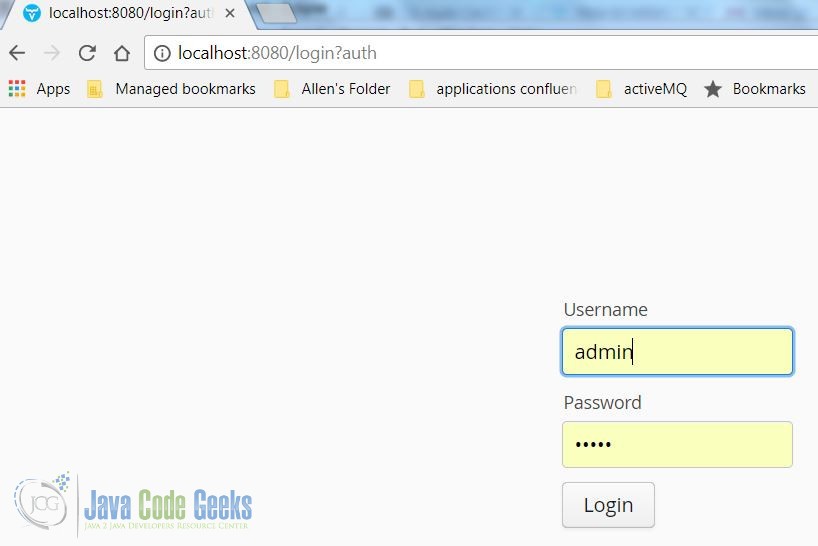
Enter a name and then click the Click Me button several times.
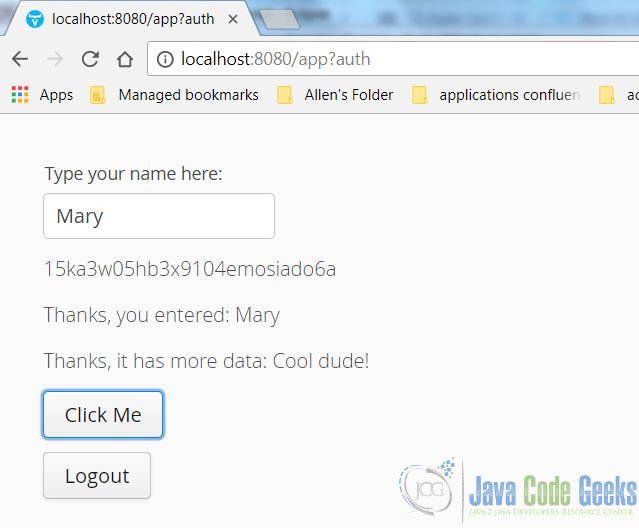
Note: For different outputs, enter different names.
Click the logout button. Enter an invalid username and password.
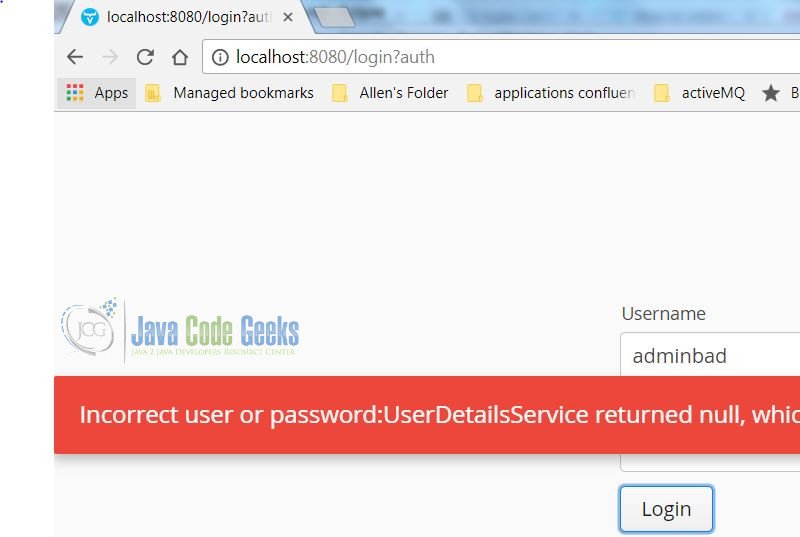
Note: Enter your valid username again, then verify that the SessionId value is updated.
7. Summary
In this example, we built a web application and secured it with a login page. The web application was created via the Vaadin Maven archetype and then modified with the MVC pattern, and then added a login page via Spring Security framework.
8. Download the Source Code
This example consists of a secured Vaadin web application.
You can download the full source code of this example here: Vaadin Spring Security Example



how can we achieve this integrated with spring boot