
1. Introduction
Java API for XML Web Services ( JAX-WS) is a Java programming language for creating web services, particularly SOAP services.
BindingProvider is an interface which provides access to the protocol binding and associated context objects for request and response message processing.
In this example, I will build a JAX-WS application and demonstrate how to use BindingProvider to set the http header value.
2. JAX-WS Background
JAX-WS 2.0 specification was introduced in 2005 and has become part of JDK since JDK6. JAX-WS 2.0 uses annotations to simplify the development and deployment of web services.
Other tools that implement JAX-WS specification are:
- Apache CXF
- Apache Axis2
- JBossWS in JBoss
- IBM WebSphere Jax-Ws in WebSphere
- Oracle Weblogic
3. Create JAX-WS Server Application
In this example, I will create a JAX-WS server application in three steps:
- Create an
Interfaceand annotate it with@WebService - Create an implementation class for the
Interface
and annotate it with@WebService(endpointInterface="") - Create an
Endpointto publish the service
3.1. Create a Web Service Interface with RPC Style
Create MathService in the RPC style.
MathService.java
package jcg.demo.jaxws.service;

import javax.jws.WebMethod;
import javax.jws.WebParam;
import javax.jws.WebService;
import javax.jws.soap.SOAPBinding;
import javax.jws.soap.SOAPBinding.Style;

/**
 * A Simple MathService using the SOAP RPC style which means the message data
 * type must be Primitive types (boolean , byte , char , short , int , long ,
 * float and double)
 *
 * @author Mary Zheng
 *
 */

@WebService
@SOAPBinding(style = Style.RPC)
public interface MathService {
	@WebMethod
	int sum(@WebParam(name = "int_a") int a, @WebParam(name = "int_b") int b);

	@WebMethod
	boolean isPrimeNumber(@WebParam(name = "number") long number);

}
- Line 18:
@WebServiceindicates it as a JAX-WS web service - Line 19:
Style.RPCdefines the message type – only primitive types - Line 21, 24:
@WebMethodmarks it as a web operation - Line 22, 25:
@WebParamdefines the parameters
3.2. Create a Web Service Interface with Document Style
Create BookService as Document Style.
BookService.java
package jcg.demo.jaxws.service;

import javax.jws.WebMethod;
import javax.jws.WebParam;
import javax.jws.WebService;
import javax.jws.soap.SOAPBinding;
import javax.jws.soap.SOAPBinding.Style;

import jcg.demo.jaxws.model.Book;

/**
 * A Simple BookService using the SOAP Document style which means the message
 * data can be any user defined POJO data type
 *
 * @author Mary Zheng
 *
 */

@WebService
@SOAPBinding(style = Style.DOCUMENT)
public interface BookService {
	@WebMethod
	Book getBook(@WebParam(name = "bookId") Integer id);
}
- Line 19:
@WebServiceindicates the service as JAX-WS web service - Line 20:
Style.DOCUMENTdefines the message type - Line 22:
@WebMethodmarks it as a web operation - Line 23:
@WebParamdefines the parameters
Create Book class.
Book.java
package jcg.demo.jaxws.model;

public class Book {
	private int id;
	private String name;

	public Book() {
		super();
	}

	public int getId() {
		return id;
	}

	public void setId(int id) {
		this.id = id;
	}

	public String getName() {
		return name;
	}

	public void setName(String name) {
		this.name = name;
	}

	public Book(int id, String name) {
		super();
		this.id = id;
		this.name = name;
	}
}
3.3. Create Web Service Implementation
Create a BookServiceImpl which authenticates the request based on the username and password from BindingProvider and then invokes getBook service.
BookServiceImpl.java
package jcg.demo.jaxws.service.impl;

import javax.annotation.Resource;
import javax.jws.WebService;
import javax.xml.ws.WebServiceContext;

import jcg.demo.jaxws.model.Book;
import jcg.demo.jaxws.model.BookUtil;
import jcg.demo.jaxws.service.BookService;

@WebService(endpointInterface = "jcg.demo.jaxws.service.BookService")
public class BookServiceImpl implements BookService {

	@Resource
	private WebServiceContext wsctx;

	@Override
	public Book getBook(Integer id) {

		AuthenticationService authService = new AuthenticationService();
		authService.authentication(wsctx);

		return BookUtil.getBook(id);
	}
}- Line 11: Hook the service implementation to the endpoint
- Line 14: Inject
WebServiceContext
Create BookUtil to return Book per bookId.
BookUtil.java
package jcg.demo.jaxws.model;

import java.util.HashMap;
import java.util.Map;

public class BookUtil {
	private static Map map;

	static {
		map = new HashMap();
		map.put(1, new Book(1, "Mary Book"));
		map.put(2, new Book(2, "Terry Book "));
		map.put(3, new Book(3, "Ben Best Book"));
		map.put(4, new Book(4, "Alex Life"));
		map.put(5, new Book(5, "David Music"));
	}

	private BookUtil() {
	}

	public static Book getBook(Integer id) {
		return map.get(id);
	}
}
3.4. Create an AuthenticationService
Create an AuthenticationService which authenticates the request based on the data from BindingProvider.
AuthenticationService.java
package jcg.demo.jaxws.service.impl;

import java.util.Base64;
import java.util.LinkedList;
import java.util.Map;

import javax.xml.ws.WebServiceContext;
import javax.xml.ws.handler.MessageContext;

public class AuthenticationService{
	public void authentication(WebServiceContext wsctx) {
		MessageContext mctx = wsctx.getMessageContext();
		Map http_headers = (Map) mctx.get(MessageContext.HTTP_REQUEST_HEADERS);

		LinkedList list = (LinkedList) http_headers.get("Authorization");
		if (list == null || list.size() == 0) {
			throw new RuntimeException("Authentication failed! This WS needs BASIC Authentication!");
		}

		String userpass = (String) list.get(0);
		userpass = userpass.substring(5);
		validateUserPwd(userpass);
	}

	private void validateUserPwd(String userpass) {
		String credentials = new String(Base64.getMimeDecoder().decode(userpass.getBytes()));

		String username = null;
		String password = null;
		int colonPos = credentials.indexOf(":");
		if (colonPos > -1) {
			username = credentials.substring(0, colonPos);
			password = credentials.substring(colonPos + 1);

			if (!(username.equals("mzheng") && password.equals("great"))) {
				throw new RuntimeException("Not Authentication for " + username + ":" + password);
			}
		} else {
			throw new RuntimeException("There was an error while decoding the Authentication!");
		}
	}
}
- Line 15: Get the
usernameandpasswordfrom the context
3.5. Create a Web Service Endpoint and Publish the Service
Create BookApp to publish BookService to http://localhost:9980/bookServer.
BookApp.java
package jcg.demo.jaxws;

import javax.xml.ws.Endpoint;

import jcg.demo.jaxws.service.impl.BookServiceImpl;

public class BookApp {

	public static void main(String[] args) {
		Endpoint ep = Endpoint.create(new BookServiceImpl());
		ep.publish("http://localhost:9980/bookServer");
	}
}
Create MathApp to publish MathService to http://localhost:9990/mathServer.
MathApp.java
package jcg.demo.jaxws;

import javax.xml.ws.Endpoint;

import jcg.demo.jaxws.service.impl.MathServiceImpl;

public class MathApp {

	public static void main(String[] args) {
		Endpoint.publish("http://localhost:9990/mathServer", new MathServiceImpl());
	}
}
3.6. Verify the Web Service
Start both MathApp and BookApp. Open web browser and navigate to http://localhost:9980/bookServer?wsdl and http://localhost:9990/mathServer?wsdl.
We should see the WSDL page loaded. Save both WSDL files.
4. Create a JAX-WS Client Application
There are several ways to generate the JAX-WS client from WSDL file:
- Java IDE, such as Eclipse, NetBeans, etc.
- Apache CXF
- Apache Axis
- JAX-WS
wsimport
In this example, I will use wsimport to generate the java source code from the WSDL via Maven plug in.
4.1. Generate Java Stub via wsimport
Create a Maven project and set up codegen profile with Maven plug in.
pom.xml
<project xmlns="http://maven.apache.org/POM/4.0.0" xmlns:xsi="http://www.w3.org/2001/XMLSchema-instance"
	xsi:schemaLocation="http://maven.apache.org/POM/4.0.0 http://maven.apache.org/xsd/maven-4.0.0.xsd">
	<modelVersion>4.0.0</modelVersion>
	<groupId>jax-ws-client</groupId>
	<artifactId>jax-ws-client-wsimport</artifactId>
	<version>0.0.1-SNAPSHOT</version>
	<build>
		<plugins>
			<plugin>
				<artifactId>maven-compiler-plugin</artifactId>
				<version>3.5.1</version>
				<configuration>
					<source>1.8</source>
					<target>1.8</target>
				</configuration>
			</plugin>
		</plugins>
	</build>

	<profiles>
		<profile>
			<id>codegen</id>
			<build>
				<plugins>
					<plugin>
						<groupId>org.codehaus.mojo</groupId>
						<artifactId>jaxws-maven-plugin</artifactId>
						<version>1.12</version>
						<executions>
							<execution>
								<id>book_wsdl</id>
								<goals>
									<goal>wsimport</goal>
								</goals>
								<configuration>
									<wsdlUrls>
										<wsdlUrl>http://localhost:9980/bookServer?wsdl</wsdlUrl>
									</wsdlUrls>
									<keep>true</keep>
									<packageName>jcg.demo.jaxws.client.book</packageName>
									<sourceDestDir>src/generated/java</sourceDestDir>
								</configuration>
							</execution>
							<execution>
								<id>math_wsdl</id>
								<goals>
									<goal>wsimport</goal>
								</goals>
								<configuration>
									<wsdlUrls>
										<wsdlUrl>${project.basedir}/wsdls/mathServer.wsdl</wsdlUrl>
									</wsdlUrls>
									<keep>true</keep>
									<packageName>jcg.demo.jaxws.client.math</packageName>
									<sourceDestDir>src/generated/java</sourceDestDir>
								</configuration>
							</execution>
						</executions>
					</plugin>
				</plugins>
			</build>
		</profile>
	</profiles>
</project>- Line 37: Set JAX-WS Service WSDL URL location
- Line 40, 54: Generated code’s package name
- Line 51: Set JAX-WS Service WSDL File name
Run mvn install -P codegen to generate two client packages.
Image below shows the JAX-WS client with generated codes.
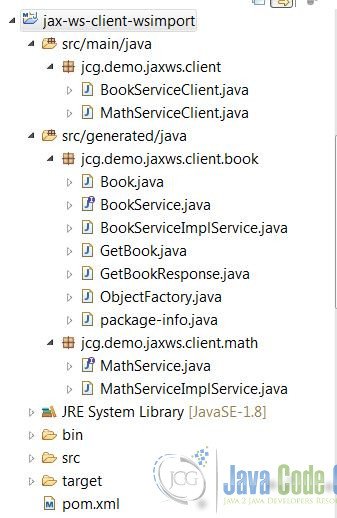
Note: JAXB is used to convert between Java object and XML for Document type message.
4.2. Create a Web Service Client
Create a BookServiceClient.
BookServiceClient.java
package jcg.demo.jaxws.client;

import java.util.Map;

import javax.xml.ws.BindingProvider;

import jcg.demo.jaxws.client.book.BookService;
import jcg.demo.jaxws.client.book.BookServiceImplService;

public class BookServiceClient {

	public static void main(String[] args) {
		BookServiceImplService service = new BookServiceImplService();
		BookService pService = service.getBookServiceImplPort();

		Map requestCtx = ((BindingProvider) pService).getRequestContext();
		requestCtx.put(BindingProvider.USERNAME_PROPERTY, "mzheng");
		requestCtx.put(BindingProvider.PASSWORD_PROPERTY, "great");

		String productionUrl = "http://localhost:9980/bookServer?wsdl";
		requestCtx.put(BindingProvider.ENDPOINT_ADDRESS_PROPERTY, productionUrl);

		for (int i = 1; i < 6; i++) {
			System.out.println(pService.getBook(i).getName());
		}
	}
}
- Line 17: use
BindingProvider.USERNAME_PROPERTYto set the username - Line 18: utilize
BindingProvider.PASSWORD_PROPERTYto set the password - Line 21: use
BindingProvider.ENDPOINT_ADDRESS_PROPERTYto set the endpoint address
Create a MathServiceClient.
MathServiceClient.java
package jcg.demo.jaxws.client;

import java.util.Map;

import javax.xml.ws.BindingProvider;

import jcg.demo.jaxws.client.math.MathService;
import jcg.demo.jaxws.client.math.MathServiceImplService;

public class MathServiceClient {

	public static void main(String[] args) {
		MathServiceImplService service = new MathServiceImplService();
		MathService pService = service.getMathServiceImplPort();

		Map requestCtx = ((BindingProvider) pService).getRequestContext();
		requestCtx.put(BindingProvider.USERNAME_PROPERTY, "mzheng");
		requestCtx.put(BindingProvider.PASSWORD_PROPERTY, "great");

		requestCtx.put(BindingProvider.SOAPACTION_USE_PROPERTY, Boolean.TRUE);
		requestCtx.put(BindingProvider.SESSION_MAINTAIN_PROPERTY, Boolean.TRUE);
		for (int i = 100000; i < 100100; i++) {
			if (pService.isPrimeNumber(i)){
				System.out.println(i + " is prime number. ");
			}
		}
		System.exit(0);
	}
}
5. Demo Time
Start two JAX-WS services: BookApp and MathApp.
Start MathServiceClient to send the request to the server.
MathServiceClient output
100003 is prime number.
100019 is prime number.
100043 is prime number.
100049 is prime number.
100057 is prime number.
100069 is prime number.
Start BookServiceClient to send the request to the server.
MathServiceClient output
Mary Book
Terry Book
Ben Best Book
Alex Life
David Music
6. Summary
In this example, I built a JAX-WS server and client based on JDK implementation and configured the context data via BindingProvider. Apache CXF provides richer implementation of JAX-WS. Use your best judgement to pick the best implementation library when developing a JAX-WS application.
7. Download the Source Code
This example consists of a JAX-WS server and a JAX-WS web service client using BindingProvider to send additional data to the web context.
You can download the full source code of this example here: JAX-WS BindingProvider Example



Hi, Mary
Thank you for your post.
I have a couple question
1. You use such code to set username & password on client side
requestCtx.put(BindingProvider.USERNAME_PROPERTY, “mzheng”);
requestCtx.put(BindingProvider.PASSWORD_PROPERTY, “great”);
and on server side you invoke substring() to get part of string and handle it
why did you do it?
String userpass = (String) list.get(0);
userpass = userpass.substring(5);
validateUserPwd(userpass);
2. Do you know what happen when on client side we set SESSION_MAINTAIN_PROPERTY = true ?
what are changing in request or response ?